📅 Updated 2026 | ⏱️ 9 min read | 🏷️ Beginner Guide
Navigating cross-border shopping platforms for the first time can often feel overwhelming, but ordering through a reliable shopping agent makes the process remarkably straightforward. If you are wondering how to buy on Kakobuy for the first time, this process is much easier than most beginners expect. Whether you are looking for trending streetwear, budget fashion finds, or specialized items from Chinese marketplaces, using an agent allows you to browse, consolidate, inspect, and ship your goods with total peace of mind.
This comprehensive walkthrough covers everything you need to know from start to finish — creating your account, browsing the best curated Kakobuy spreadsheet, submitting item details, inspecting warehouse quality check (QC) photos, and choosing the most cost-effective shipping route. By following this end-to-end guide, you will master how to buy on Kakobuy with complete confidence.
Before diving into the step-by-step instructions, it helps to understand how a shopping agent operates. Marketplaces like Taobao, Weidian, and 1688 primarily serve domestic buyers in China. Most sellers on these platforms do not ship internationally or accept global credit cards directly.
Kakobuy acts as your bridge and logistics manager in China:
Purchasing Service: You tell Kakobuy what you want, and their local team purchases the items from domestic sellers on your behalf.
Free Warehouse Storage: Sellers ship your items to Kakobuy’s central warehouse, where they are stored safely while you build your haul.
Quality Inspection: Warehouse staff inspect every item upon arrival, taking detailed high-resolution photos so you can check quality before shipping overseas.
Package Consolidation: You can combine multiple orders from completely different sellers into one single package, drastically reducing international freight costs.
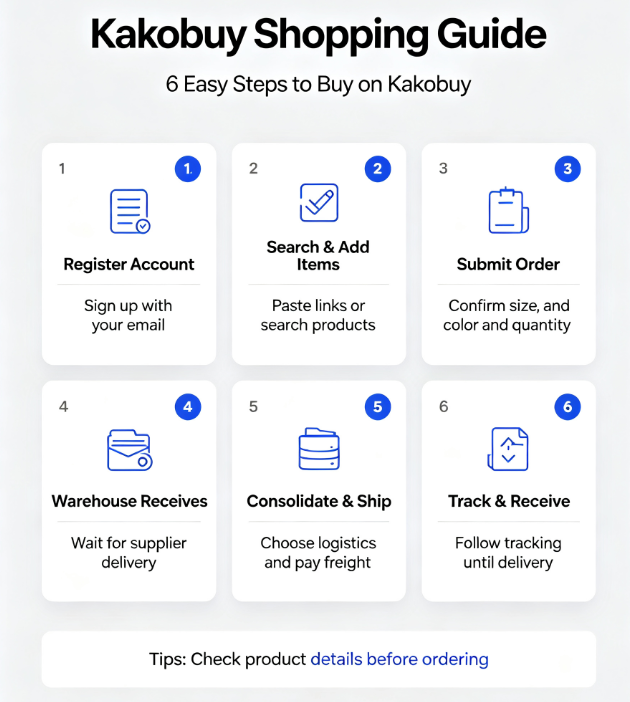
To begin, head over to Kakobuy and sign up for a free account using your primary email address. Create a strong password and complete any identity verification steps. Once logged in, take a moment to enable two-factor authentication (2FA) in your account settings for extra security. Your account dashboard will serve as your main control center for tracking orders, reviewing stored inventory, and managing international deliveries.
Instead of searching directly on Chinese e-commerce websites where language barriers and search filters can be tricky, start with a curated product spreadsheet or trusted community hub. These curated sheets filter out low-quality listings, highlight verified seller shops, and categorize items by style, brand, and popularity. Browse through categories that interest you and copy the exact product URLs of the items you wish to buy.
Return to Kakobuy and paste the product link into the top search bar. The platform will automatically load the product page, translating key options into English. Select your desired colorway, size, and quantity. If you have specific instructions for the agent — such as asking them to verify a size chart, check for loose threads, or request specialized measurements — add clear notes in the order remark box. Once everything looks accurate, click to add the item to your shopping cart.
When your cart is ready, proceed to checkout. At this first stage, you are paying the item subtotal, which includes the seller’s price plus a small domestic shipping fee to transfer the item from the seller to Kakobuy’s warehouse. International freight is calculated separately later. Select your preferred payment method (such as credit card, balance top-up, or third-party digital payment) and complete the transaction.
After payment confirmation, Kakobuy agents place the order directly with the domestic seller. The seller will ship the item to Kakobuy’s warehouse facility. During this stage, you can monitor live status updates directly on your user dashboard (e.g., “Purchased,” “Shipped,” or “Arrived”). This waiting period is the ideal time to keep browsing and build up a consolidated parcel.
Once your items land at the warehouse, staff will weigh the package, log it into your storage unit, and upload high-resolution Quality Check (QC) photos to your dashboard. Log in and carefully inspect every photo:
Check color accuracy, print quality, and overall appearance against the seller listing.
Inspect stitching, tags, logos, zippers, and buttons for noticeable defects.
If you need specific measurements or closer images of details, submit a request for additional photos.
If you notice a flaw or received the wrong size, click the exchange/return button promptly so the agent can resolve it with the seller.
When you are satisfied with all items in your warehouse inventory, select the items you want to ship together and submit a parcel submission request. You will be presented with several international shipping lines based on speed, cost, weight limits, and destination rules. Check our comprehensive Kakobuy shipping lines guide for a detailed comparison of tax-free lines, postal routes, and express couriers. Choose the route that best aligns with your timeline and budget.
Before finalizing your parcel, fill out the customs declaration form. Most shipping lines offer system-assisted declaration suggestions, or you can enter a reasonable declared value based on your local import thresholds. Check your account dashboard for active shipping coupons or promo codes to lower your total cost, select any extra parcel packaging options (such as bubble wrap or corner protection), and pay the international shipping fee.
Within 24 to 48 hours after payment, your tracking number will activate. You can monitor progress directly through Kakobuy or via universal tracking tools. When your parcel arrives at your doorstep, record a quick unboxing video as you open the box. Verify every item against your original order list and QC records. Keeping this unboxing record handy ensures you have clear evidence if you ever need to contact support regarding a missing or damaged item.
To ensure your first purchasing experience is completely hassle-free, keep these practical tips in mind:
Start with a Small Trial Haul: If you are nervous about your first order, start small. Buying just one or two items allows you to learn the entire order-to-delivery flow without risking a large sum.
Always Consolidate for Savings: International shipping rates usually charge a heavy base fee for the first 500 grams, with smaller incremental costs for additional weight. Shipping 3 to 5 items together in one package is vastly more cost-effective than shipping items individually.
Pay Attention to Packaging Extras: If you are ordering footwear or fragile items, consider requesting shoe box removal (to save physical weight and volume) or adding reinforced carton edge protectors to prevent transit damage.
Keep Communication Clear: When writing notes for warehouse staff or sellers, use short, direct English sentences to avoid translation confusion.
Learning how to buy on Kakobuy is one of the easiest ways to access products directly from Chinese suppliers without language or payment barriers. By leveraging organized product spreadsheets, carefully checking your warehouse inspection photos, and selecting the right shipping line for your region, you can safely build custom hauls from the comfort of your home. Follow this walkthrough step by step, start your first trial order, and enjoy a seamless global shopping experience!